🎙 Tap mic to dictate. If the browser says “not allowed,” use Windows mic (local PC) or click the chat box and press Win+H. Nothing sends automatically.
Enter send · Shift + Enter new line♡ Local Ollama · separate character memories
PERSONALIZE YOUR CHAT
Settings ♡
ALICIA MEDIA STUDIO · YOUR EXISTING HFS 3 SERVER
🌐 Alicia Media Studio — HFS connection
Connect to your installed HFS server or launch its executable from Alicia. HFS is the only media backend. Its original accounts, files, theme, and plugins remain under HFS control.
You can put hfs.exe beside AliciaCompanion.exe or in an HFS subfolder and leave this blank. Alicia won't download or install HFS on its own.
HFS is checked when you open the Media screen.
For live connection diagnostics, open Media Studio and choose Connection details. HFS passwords and shared files stay managed by HFS. Public HTTP does not encrypt your traffic.
DIRECT HTTP • COMPANION ACCESS
🌐 Companion Web Server
Serve Alicia Companion directly from your Windows PC. Choose an address and port, then use your PC's local IP or forward the port on your router for outside access. No tunnels or third-party services.
● OFFLINE
Choose your own username. Letters, numbers, periods, underscores, and hyphens. Existing installs keep guest until you change it. Save with Start HTTP server / Apply changes.
Short passwords are allowed, but risky over public HTTP. A unique, longer password is strongly recommended. Passwords are saved only as salted hashes. Click Verify login to confirm both username and password.
Ready. Choose a password, then start the HTTP server.
Local browser: http://localhost:8765 (this PC only)
The local browser address is available automatically while Alicia Companion runs. LAN/Internet guest access still requires a password and an explicit Start HTTP server action.
Forward your selected TCP listening port in your router to this PC's local IPv4 address and allow the app through Windows Defender Firewall. Connect to your public IPv4 address using plain HTTP.
Use the router's WAN IPv4, not your PC's 192.168.x.x address. If the router WAN IP starts with 10., 192.168., 172.16–31., or 100.64–127., you probably cannot forward directly through that upstream NAT.
PUBLIC HTTP URLEnter your public IPv4 above
Internet access checklist
Start sharing with LAN / Internet — all IPv4 interfaces and a unique password.
Run ENABLE-INTERNET-HTTP-FIREWALL.cmd from the extracted ZIP as Administrator; it asks before opening a restricted TCP rule.
Reserve this PC's LAN IPv4 address in your router's DHCP settings.
Forward the chosen external TCP port to this PC's LAN IPv4 and the same internal TCP port.
Enter the router's public WAN IPv4 above. From a phone on cellular (Wi-Fi off), open the generated http://IP:PORT address.
If that fails, check double NAT/CGNAT, router forwarding, firewall scope, and whether the ISP blocks inbound traffic.
Stop sharing: use Stop HTTP server and optionally DISABLE-INTERNET-HTTP-FIREWALL.cmd. No router changes are made automatically.
External access requires a reachable public IPv4 address, router port forwarding, and a Windows firewall rule allowing non-local clients. The original Private LAN-only firewall helper is NOT sufficient for internet traffic. Carrier-grade NAT or double NAT may prevent port forwarding. The app does not change your router or firewall automatically.
⚠ UNENCRYPTED HTTP: Internet and Wi-Fi traffic, including the password in HTTP Basic authentication and the chat text, can be read or modified by anyone able to intercept the connection. Do not reuse an important password or share sensitive information. The guest API is restricted, but exposing any desktop service to the public internet carries risk. No HTTPS or Cloudflare is used.
The host-only admin controls and host chat history remain on the local desktop. Ollama and text-to-speech run on your Windows PC, which must remain switched on.
Click Test server to verify the actual local listener, password challenge, and connection tips.
Default: your selected local Ollama model.
Faster Qwen3-TTS 1.7B VoiceDesign is selected for ALL SEVEN mascots on port 8895. It retains design instructions for each distinct character; original Qwen port 8892 remains available. Fish, OmniVoice and other engines remain optional. Peach and Blue Hoodie overrides are inactive while Qwen is selected.
Run REMAKE-PEACH-AND-BLUE-OMNIVOICE.cmd to create both new voice clones. Other five characters are unchanged.
To build both new clones, run REMAKE-PEACH-AND-BLUE-OMNIVOICE.cmd. The other five characters are unchanged.
Peach and Blue Hoodie now have independently remade OmniVoice profiles; both play at normal speed with no forced pitch shifting. The other five characters and the original clones are preserved.
Off (recommended for fast Qwen playback): starts speaking after the first chunk, while generating the next in parallel. On: prepares the entire reply first for gapless playback, but can take much longer to begin.
No forced temperature, output cap, context size, repetition penalty, or reasoning setting. Ollama's installed model controls these defaults.
Checking local services…
Stay in character supplies only the selected companion identity and your conversation to the installed Ollama model. No separate application-level chat-content filter is added; the Ollama model controls its responses. Literal model passthrough removes even the character identity prompt. Networking and authentication protections stay enabled.
✦ Cinematic Animation Studio
Seven animated room atmospheres, seven controllable emotions per catgirl, eye-blink sprites, sleep/wake eye closure, 17 gestures, adjustable poses for Alicia, audio-reactive mouth sprites, and pointer parallax. Eye and mouth sprites are registered 2D artwork; Alicia’s reconstructed five-digit hand uses independently articulated finger bones and a rotating wrist; this is a 2D reconstruction, not a rigged Live2D model. Independent hair, ears, lips and limbs still require a layered/rigged model. See LIVE2D-SETUP.txt for optional Cubism integration.
Checking installed Live2D models…Respects your operating system’s Reduced Motion setting. All animation preferences are stored locally.
About these cards
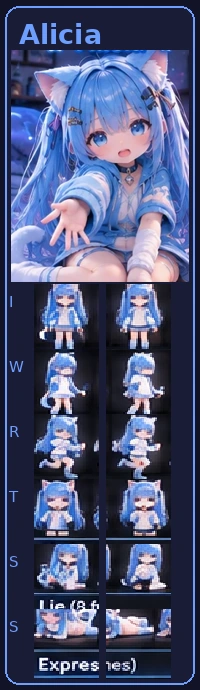
Seven Worlds uses seven illustrated luxury environments with selectable Daylight, Romantic, and Midnight lighting with glamorous, atmospheric lighting. Each character has her own room, and the room setting can be switched off to see the original studio portrait. Neon Studio uses the new seven-character reference sheet and includes a full-body portrait, turnaround references, face expressions, and pose images. The illustrated characters are static. You can switch back to the previous petite or original cards anytime. Tap a card for a random Qwen3-TTS greeting.
Privacy
Ollama and voice generation use local services on your PC. On the public web endpoint, each visitor’s chat stays in their own browser, not in your host account. Voice dictation uses the browser speech provider where supported; otherwise it uses the Windows local speech recognizer. Remote microphone access requires HTTPS. Audio is not retained by the local fallback.
Alicia can check whether HFS responds and inspect some embedding headers, but a different-origin iframe cannot always be verified. If the page stays blank, open HFS in your browser.